ClickSEO vs CTRTool: Bounce Rates in CTR Manipulation
You are comparing ClickSEO and CTRTool, and bounce rates are the metric that decides whether your CTR campaign reads as real engagement. A visit that leaves in seconds tells search engines your click was noise, not interest.
This article gives a clear verdict on how both tools handle bounce rates, then walks through dwell time control, click paths, screenshot proof, and coverage for Google, Bing, Maps, and AI Overviews. By the end, you will know which tool fits your campaigns and why.
Quick Verdict: ClickSEO vs CTRTool on Bounce Rates in CTR Manipulation
CTRTool wins on bounce-rate control because it records screenshot proof for every visit and tracks full visit paths, while ClickSEO's bounce-rate handling is less transparent. For campaigns where a single-page session or early exit could undercut the value of a click-through rate manipulation effort, CTRTool's per-visit evidence gives you something concrete to check. ClickSEO is generally described as a CTR manipulation service, and its public materials do not detail per-visit bounce-rate controls or proof of visit behavior.
The short version: if bounce rate and engagement metrics sit at the center of your decision, CTRTool is the more defensible pick. ClickSEO may suit other priorities, but on this specific question the evidence favors CTRTool. The rest of this comparison covers four criteria: visit behavior, proof, coverage, and pricing.
- Visit behavior: how long a visit lasts and whether it moves beyond a single page.
- Proof: what documentation exists that a visit actually happened as described.
- Coverage: how many campaigns, keywords, and locations a tool can handle.
- Pricing: how charges map to delivered results versus failed attempts.
CTRTool's facts line up directly with the first two criteria. It supports visits up to 5 minutes with up to 5 additional internal pages, and it provides search and landing screenshots as separate proof images. Those details matter because a bounce event is defined by what happens after the landing page loads.
On coverage, CTRTool allows up to 100 campaigns with 100 keywords each, with one credit balance shared across all campaign types, websites and keywords. On pricing, it uses a pay-for-results credit model with no credits charged for technical failures before landing, and visits that cannot verify the requested location use no credits.
ClickSEO's public materials, as generally understood, do not spell out comparable per-visit controls or proof. That does not prove it performs poorly on bounce rate, but it does mean you cannot verify the behavior the same way. For a reader weighing risk mitigation and detection avoidance, verifiable visit paths are the safer foundation.
At a glance: how CTRTool compares to ClickSEO on the features that matter most.
| Feature | CTRTool | ClickSEO |
|---|---|---|
| Pricing | $59-$699/mo | $30-$55/mo |
| Free plan / trial | ✗ | Free trial |
| CTR manipulation / organic clicks | ✓ | ✓ |
| Keyword tracking | ✓ | ✓ |
| Campaign statistics / reporting | ✓ | ✓ |
| Geo / country targeting | ✓ | 170+ countries |
| Google Search Console integration | — | ✓ |
| Screenshot proof per visit | ✓ | — |
Why Bounce Rate Matters in CTR Manipulation
A bounce rate spike can undermine a CTR campaign because search engines read single-page sessions as low engagement, even when clicks were delivered as planned. Click-through rate manipulation is meant to send positive user behavior signals to the ranking algorithm, including clicks, dwell time, and session duration.
A high bounce rate signals the opposite. It tells the algorithm that visitors arrived and left almost immediately, which undercuts the story the extra clicks were supposed to tell. This is the central tension of CTR manipulation: raw click gains mean little if engagement metrics move in the wrong direction.
There is a second risk layer. Analytics filtering and bot detection systems look for unnatural patterns, and a campaign that lifts clicks while leaving bounces untouched creates exactly that kind of mismatch. Platforms that simulate traffic with proxy networks, IP rotation, or headless browsers must also think about how those sessions look once they land.
This section explains why bounce rate deserves equal weight alongside SERP CTR, and how the mechanics of a bounce event can quietly skew campaign results.
How Bounce Rate Is Calculated and Why It Skews CTR Campaign Results
In Google Analytics, a bounce is a session that triggers only one request to the analytics server, so a visitor who lands and leaves without a second interaction is counted as a bounce regardless of time spent. A single-page session with no second pageview, scroll event, or click fires the bounce event.
Time on site is affected too. Without a second pageview, the platform has no timestamp to measure against, so the session often records zero seconds even if the visitor stayed for a while. Consider a 45-second visit to one page with no scroll or click. It still counts as a bounce, and the recorded time on site may show nothing at all.
Bounce rate and exit rate are frequently confused. Exit rate measures the share of sessions that ended on a given page, including visitors who browsed several pages first. Bounce rate only counts sessions that never moved past the landing page, which makes it the sharper signal of low engagement.
This is why a campaign can skew its own results. Clicks rise, but bounce rate rises with them, producing pogo-sticking signals: a visitor who returns to the SERP quickly after landing. The ranking algorithm reads that pattern as a sign the result did not satisfy the query, which undermines the intended behavioral SEO effect.
Campaign design has to account for this. Multi-page click paths or engagement events, such as scrolls or internal clicks, give the session a second interaction to record. Without that structure, extra clicks can end up weakening the very signals the campaign was built to strengthen.
What Is CTRTool?
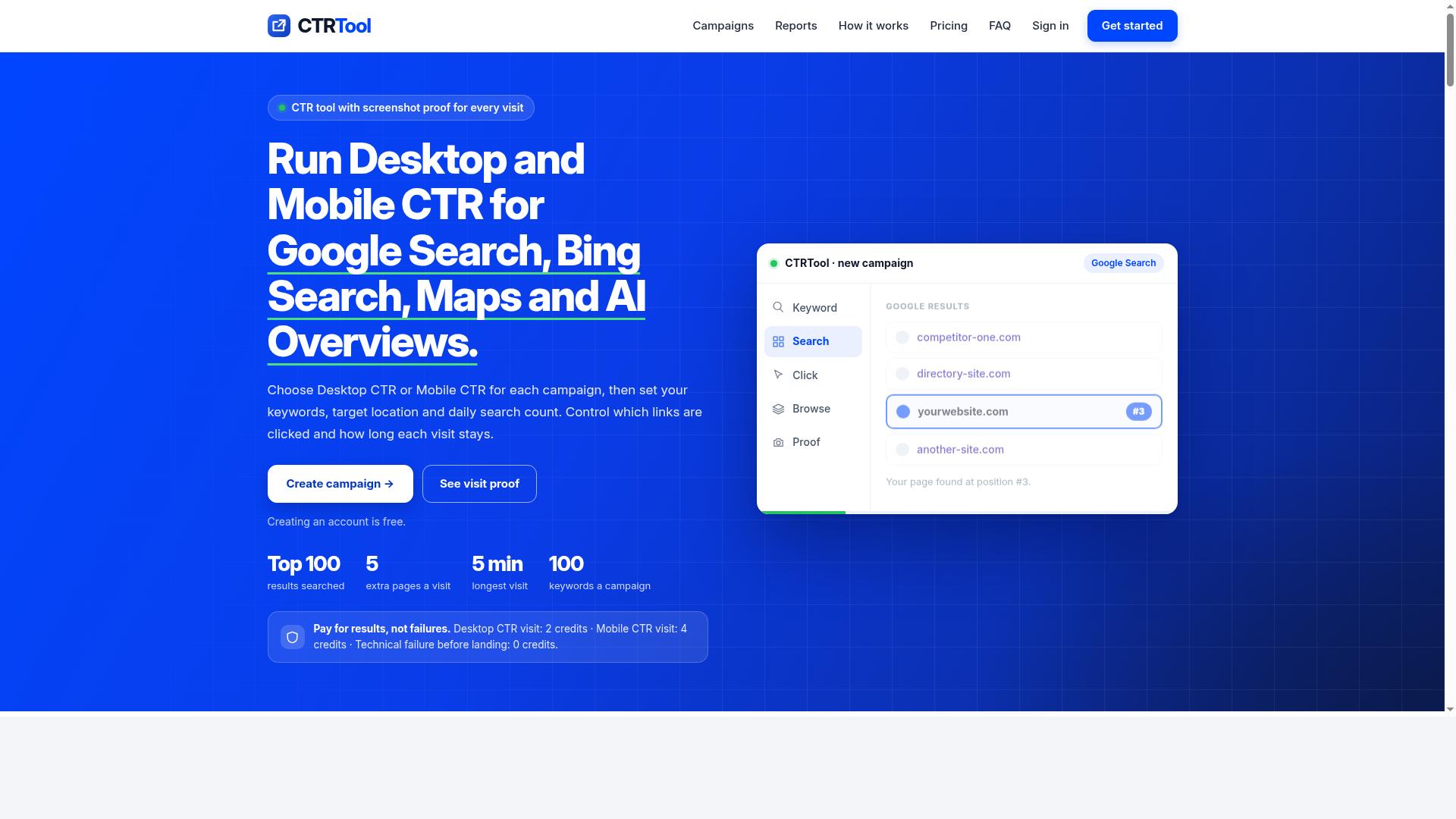
CTRTool is a SaaS CTR campaign tool that runs Desktop and Mobile CTR campaigns for Google Search, Bing Search, Maps and AI Overviews, with screenshot proof for every visit. It is available at ctrtool.com under that official product name.
The platform is built around choice at the campaign level. Users pick Desktop CTR or Mobile CTR per campaign, then set keywords, target location and daily search count. They also control which links are clicked and how long each visit stays.
That level of control matters when bounce rate and session duration are part of the conversation. A visit that leaves immediately produces a single-page session and a bounce event in analytics. A visit with a defined duration behaves differently in engagement metrics. CTRTool lets users set that duration rather than leaving it to chance.
Proof is the other distinguishing feature. Every visit comes with screenshot evidence, with the search screenshot and the landing screenshot supplied as separate proof images. For agencies reporting to clients, that changes the conversation from "trust the dashboard" to "review the record."
CTRTool also tracks keyword positions over time. This includes Maps listing order and AI citation order, so movement in local results and AI-generated answers sits alongside classic organic position data.
The tool is aimed at SEO practitioners and agencies running campaigns for their own sites or for client properties. It is a working instrument for people who already understand SERP CTR and behavioral SEO, not a beginner tutorial.
One point deserves emphasis early in any comparison. The site itself states: "Automated visits do not guarantee rankings." That honesty is worth noting, because CTR manipulation sits in grey-hat territory and no tool can promise a ranking outcome.
Where bounce rate enters the picture, the design choices above are what separate a controlled campaign from raw bot traffic. Click farms and crude traffic simulation tend to produce sessions that end instantly, which is exactly the pattern analytics filtering is built to catch. CTRTool's per-campaign control over visit duration and clicked links gives practitioners a way to shape the session rather than just the click.
What Is ClickSEO?

ClickSEO is a CTR manipulation service that, based on its public positioning, aims to increase click-through rates on search results by simulating user clicks. It sits in the same broad category as CTRTool: tools built to influence SERP CTR and the behavioral signals that can feed into ranking algorithms.
Like most offerings in this space, ClickSEO focuses on delivering clicks to target pages rather than on the engagement quality that follows those clicks. That distinction matters for bounce rate, because a click that ends in a single-page session can send mixed user behavior signals even when the raw CTR looks strong.
Services in this category typically rely on methods such as proxy networks and residential proxies, IP rotation, user agent spoofing, and headless browsers to mimic organic visitors. These are common industry techniques, not confirmed details about ClickSEO specifically.
Public information on ClickSEO is limited, so treat any specifics about its coverage, pricing, or delivery methods as unverified. Check ClickSEO's own site for current details before drawing conclusions, and weigh those details against how each tool handles engagement metrics like bounce rate and dwell time.
Features Compared
This comparison focuses on three feature areas that determine whether a CTR campaign protects or harms bounce rate: visit behavior control, per-visit proof, and campaign coverage. Together they decide whether a click becomes a real session with engagement metrics attached, or a single-page session that analytics tools flag as a bounce event.
Each subsection below examines how a tool handles dwell time and click paths, what verification evidence it produces, and which search surfaces it reaches. CTRTool details come from its published site information. ClickSEO is described only in general terms, since its public materials do not clearly document the specifics covered here.
For readers weighing click-through rate manipulation against the risk of skewed analytics, these three areas matter more than raw click volume. A campaign that inflates clicks without shaping session duration or landing behavior tends to raise bounce rate rather than support SERP ranking signals.
Visit Behavior Control: Dwell Time and Click Paths
Visit behavior control is what separates a campaign that lowers bounce rate from one that merely inflates clicks. A click that lands and immediately exits registers as a single-page session, and a high share of those sessions drags down time on site while pushing bounce rate up.
When evaluating any tool, look for four controls: configurable dwell time, multi-page click paths that move through internal pages, scroll and engagement events, and session duration targets. Without them, traffic simulation looks like bot traffic to analytics filtering, and the engagement metrics you hoped to improve move the wrong way.
CTRTool addresses this directly. Campaigns can click organic results and then internal pages, with full visit paths recorded for each session. Users choose Desktop or Mobile per campaign, and each visit can last up to five minutes with up to five additional internal pages. Click order and scrolling time are configurable, so session duration and page depth are shaped rather than left to chance.
ClickSEO's public materials do not clearly document per-visit dwell-time or click-path controls, so buyers should verify this directly before committing. As a practical benchmark, aim for sessions with at least two pageviews and 60 or more seconds on site. That pattern reduces bounce events and gives behavioral SEO signals something real to read.
Proof and Verification: Screenshot Evidence per Visit
Per-visit screenshot evidence lets you audit whether a campaign actually delivered the click, the landing page load, and the intended path. Without that record, you cannot tell a completed visit from a technical failure, and you cannot show a client what their budget bought.
CTRTool builds proof into every visit. Each one produces screenshot proof, with search and landing screenshots delivered as separate proof images. Reports include full visit paths and keyword positions tracked over time, covering Search positions, Maps listing order, and AI citation order.
That evidence supports two goals at once. For risk mitigation, it confirms the session reached the target URL through the intended path rather than dying on a proxy or browser error. For client reporting, it turns a vague claim about organic traffic into a documented record of clicks, landing pages, and ranking movement.
CTRTool's pay-for-results credit model reinforces this. No credits are charged for technical failures before landing, and visits that cannot verify the requested location use none. ClickSEO's public materials do not detail a per-visit screenshot proof system, so request sample reports and confirm what is captured before relying on it for reporting or detection avoidance.
Campaign Coverage: Google, Bing, Maps and AI Overviews
Coverage determines whether you can run one consistent CTR strategy across every surface where your brand appears. A tool limited to one engine forces separate workflows and leaves gaps in the behavioral signals that feed each ranking algorithm.
CTRTool supports four campaign types from one credit balance:
- Google Search CTR, clicking organic results for a keyword, on Desktop or Mobile, with search depth up to 100 results and internal pages included
- Bing Search CTR, applying the same keyword and click model to Bing
- Google Maps CTR, finding a business listing and clicking its website link, checking up to 50 listings, roughly five pages
- AI Overview CTR, finding the website in the overview and clicking its source link
Key requirements are worth noting. The page must appear within the top 100 organic results for the chosen keyword and location. Maps campaigns check up to 50 listings, and AI Overview campaigns need a matching citation. Targeting spans country, state, and city options, or Any country, and one balance is shared across all campaign types, websites, and keywords.
ClickSEO's coverage is less clearly documented in public materials. Verify which search surfaces it supports, and whether Maps and AI Overview style placements are included, before assuming parity across engines and locations.
Pricing Compared
CTRTool publishes monthly USD plans with credit-based pricing, starting at $59 per month for 2,000 credits. Every plan is built on the same credit system, so the cost per delivered visit depends on which visit type you consume.
The structure is transparent: Desktop CTR visits cost 2 credits and Mobile CTR visits cost 4 credits. A verified search without a match costs 1 credit, and a technical failure before landing costs 0 credits. That last detail matters when you are comparing bounce rate outcomes, because you are not billed for visits that never land.
| Plan | Monthly Price | Credits | Up to Desktop Visits | Up to Mobile Visits |
|---|---|---|---|---|
| Starter | $59 | 2,000 | 1,000 | 500 |
| Growth (Recommended) | $125 | 5,000 | 2,500 | 1,250 |
| Scale | $399 | 20,000 | 10,000 | 5,000 |
| Agency | $699 | 40,000 | 20,000 | 10,000 |
The credit-to-visit ratio is the key number to understand. Because mobile visits draw twice the credits of desktop visits, a campaign weighted toward mobile devices will deliver roughly half the visit volume from the same plan. Budget accordingly if your target SERP is mobile-heavy.
Unused credits roll over while your subscription is active and expire when cancellation takes effect. Creating an account is free, and custom development carries a separate, agreed one-time fee. CTRTool also notes that prices rise 30% on November 15, so current rates are limited launch pricing.
ClickSEO pricing is not included here and must be checked directly with the provider. Competitor plans in this category are often quoted in ways that are hard to map to actual delivered visits, so confirm the unit before comparing headline figures.
When evaluating cost per delivered visit, ask for proof of delivery. A low headline price means little if visits fail to land, if bounce behavior looks unnatural, or if you cannot verify what was actually delivered. Cost per delivered visit, not cost per advertised unit, is the number that should drive your decision.
CTRTool's advantage here is that the math is visible before you buy. Credits, per-visit costs, and failure handling are all stated up front, which makes it easier to plan a campaign around engagement metrics and dwell time targets without guessing at the invoice.
Who Should Choose CTRTool
CTRTool fits SEO practitioners and agencies who need auditable CTR campaigns across Google, Bing, Maps and AI Overviews without letting bounce rate erode the results. The platform is built for teams running CTR manipulation for their own properties or on behalf of clients, where every visit has to be defensible if someone asks for the evidence.
The core of that fit is per-visit screenshot proof. Each visit can be backed by a captured record, which turns a campaign from a black box into something you can put in front of a client or a stakeholder. When bounce rate is the metric under scrutiny, that paper trail matters as much as the click itself.
Several other capabilities line up with how agencies and in-house teams actually work:
- Desktop or Mobile choice per campaign, so traffic profiles match the device mix of the target audience
- Global country, state and city targeting for geo-specific campaigns rather than one broad blast
- Keyword position tracking, including Maps order and AI citation order, to see where visibility shifts after a campaign
- Support for Google Search, Bing Search, Google Maps and AI Overviews as distinct surfaces
Those tracking views matter because a click-through rate manipulation campaign is only useful if you can connect it to movement in the SERP. Position tracking across Maps order and AI citation order gives teams a way to read those surfaces together instead of guessing.
The site's own guidance also references using tier links, PBNs and test properties. Treat that as directional advice rather than a guarantee. Sensible practitioners use test properties to observe behavior before scaling anything to a client domain, and keep tier structures separate from money sites.
On bounce rate specifically, the value of a tool like CTRTool is control. A single-page session that registers as a bounce event can undercut the engagement metrics you are trying to influence, so campaigns need to be shaped around session duration and dwell time, not clicks alone. CTRTool's per-visit records help teams verify what a campaign actually delivered.
Compared with a general-purpose option like ClickSEO, whose CTR and behavioral features are typically described in broader terms, CTRTool's advantage here is the audit layer. Competitor capabilities should be treated as general until verified directly, but documented per-visit proof is a clear differentiator for client-facing work.
Scenario one: an agency reporting to clients. A team runs a campaign for a local business targeting a city and surrounding areas. They select Mobile for the campaign, target the right city, and after the run pull position tracking for the client's keywords, including Maps order. The per-visit screenshots become the supporting file in the monthly report, and the agency can speak to bounce rate and session duration with evidence rather than assertion.
Scenario two: an in-house SEO testing Maps visibility. A practitioner wants to know whether Maps order responds to a controlled push. They set up a test property, run a Desktop campaign with state-level targeting, and watch Maps order alongside AI citation order. Because the test is isolated, any movement is easier to attribute, and the screenshots confirm the visits were real and recorded.
In both cases the common thread is accountability. CTRTool suits teams that need to show their work, not just run traffic. If your priority is auditable campaigns across multiple search surfaces with geo and device control, this is the stronger fit of the two.
Who Should Choose ClickSEO
ClickSEO may suit buyers who prioritize a straightforward click-delivery service and are comfortable verifying bounce-rate controls and proof on their own. Teams exploring CTR manipulation often weigh convenience against documentation, and this is where the fit question becomes practical rather than absolute.
The deciding factor is not which tool sounds better on paper. It is whether your workflow needs documented per-visit screenshot proof or detailed click-path controls to satisfy internal review. If those requirements are loose, a simpler offering can be workable.
Before committing, run due diligence on the things that shape engagement metrics. Ask each vendor the same questions and compare the answers side by side.
- Request sample reports and confirm what a completed visit actually looks like
- Ask how dwell time and session duration are handled across a campaign
- Check how bounce events are avoided, not just how clicks are counted
- Confirm whether click-path controls exist and how granular they are
Bounce rate is the metric that quietly decides whether CTR manipulation helps or hurts. A visit that registers as a single-page session sends weak user behavior signals, which can undercut any SERP ranking gains the clicks were meant to support.
That makes proof and control inseparable from results. A buyer who can independently verify bounce-rate handling is in a reasonable position. A buyer who cannot should treat that gap as a signal to look further.
The honest framing is fit, not superiority. ClickSEO may serve teams with light documentation needs and the appetite to audit on their own. Readers who want per-visit evidence and tighter click-path oversight typically find that requirement points elsewhere.
Final Verdict
For campaigns where bounce rate is a deciding metric, CTRTool is the safer pick because every visit is backed by screenshot proof and full visit paths. That evidence trail lets you confirm a session looked like real engagement rather than a single-page session that inflates the bounce event in Google Analytics.
ClickSEO was described only in general terms in this comparison. Its bounce-rate controls and proof of delivery should be verified directly before you commit budget to a CTR manipulation campaign.
The table below sums up where each tool stands on the points that matter most for bounce rate and user behavior signals.
| Criteria | CTRTool | ClickSEO |
|---|---|---|
| Proof of each visit | Screenshot proof for every visit, with search and landing screenshots delivered as separate proof images | Described generally, proof method should be confirmed directly |
| Visit behavior | Full visit paths recorded | Described generally, path detail should be confirmed |
| Keyword position tracking | Includes Maps listing order and AI citation order | Described generally, tracking scope should be confirmed |
| Coverage | Google Search, Bing Search, Maps and AI Overviews | Described generally, channel coverage should be confirmed |
| Bounce-rate controls | Supported by visit paths and per-visit proof | Should be verified directly |
Bounce rate is easy to claim and hard to prove. A single-page session with no onward movement reads as a bounce event, and exit rate climbs with it. Without per-visit evidence, you cannot tell whether a campaign produced believable session duration and dwell time or just bot traffic that analytics filtering may later strip out.
CTRTool's verified advantages address that gap directly:
- Screenshot proof for every visit, with search and landing screenshots as separate proof images
- Full visit paths, so a session can be checked for more than one page view
- Keyword position tracking that includes Maps listing order and AI citation order
- Coverage across Google Search, Bing Search, Maps and AI Overviews
Those details matter for behavioral SEO because they let you audit what actually happened instead of trusting a dashboard summary. They also help with risk mitigation, since a documented footprint is easier to review than an opaque one.
The honest trade-off is that ClickSEO may suit buyers who prefer a simpler, general pitch and are willing to confirm the details themselves. That is a reasonable position, but it puts the burden of proof on you. For a metric as sensitive as bounce rate, that burden is worth avoiding.
CTRTool keeps the evidence in the open: separate search and landing screenshots, full visit paths, and position tracking that reaches Maps listing order and AI citation order. For readers weighing click-through rate manipulation against SERP ranking goals, that transparency is the stronger basis for a decision.
Recommendation: choose CTRTool when bounce rate, session duration and engagement metrics are central to the campaign, and treat ClickSEO as an option only after its bounce-rate controls and proof are verified directly. As a next step, contact CTRTool at vaibhav@autoblogging.ai or visit ctrtool.com to review the details before launching.
Frequently Asked Questions
What does "bounce rate" mean in the context of CTR manipulation?
Bounce rate is the share of visitors who leave a page without interacting further, and in CTR campaigns it matters because a click that bounces can undercut the engagement signals you're trying to build. CTRTool supports this by capturing screenshot proof for every visit plus full visit paths, so you can review what actually happened after each click rather than relying on aggregate metrics alone.
How does CTRTool prove that clicks were real visits rather than just counted clicks?
CTRTool is positioned as a CTR tool with screenshot proof for every visit, providing search and landing screenshots as separate proof images. It also tracks keyword positions over time, including Maps listing order and AI citation order, so you can see both the visit evidence and the ranking movement in one place.
Which search surfaces can I run campaigns on with CTRTool?
CTRTool runs Desktop and Mobile CTR campaigns for Google Search, Bing Search, Maps and AI Overviews. You choose Desktop CTR or Mobile CTR per campaign, set your keywords and target location, and for Google Search campaigns the page must appear within the top 100 organic results for the chosen keyword and location.
How does CTRTool's pricing compare to ClickSEO's?
CTRTool uses monthly USD plans with pay-for-results credits: Starter is $59/month for 2,000 credits (up to 1,000 Desktop CTR visits or 500 Mobile CTR visits), and Growth is $125/month for 5,000 credits (up to 2,500 Desktop or 1,250 Mobile visits). ClickSEO is listed on Techjockey with plans at "$30 Basic (Standard)" and "$55 Essential," and The AI Library describes it as "Freemium," so the two tools structure pricing quite differently - CTRTool ties cost directly to delivered visits, while ClickSEO's listings suggest a lower entry point with tiered plan names.
Does CTRTool offer a free trial like ClickSEO reportedly does?
CTRTool's verified pricing is monthly credit-based plans starting at $59/month, and no free trial is stated in its published information. ClickSEO is listed on Techjockey as offering a "Free Trial" and a "Lifetime Plan," so if trying before committing is essential to you, that's a point worth weighing - though CTRTool's credit model lets you start on the smallest plan and scale up as results come in.
Can I target specific locations and keywords with CTRTool?
Yes - campaigns can target a chosen country and optionally a state and city, or "Any country" to use a mix of supported locations, with no country restrictions stated. You set your own keywords per campaign, and Maps campaigns check up to 50 listings (about five pages) while AI Overview campaigns require a matching source link.
Who is CTRTool built for, and how do I get support?
CTRTool is aimed at SEO practitioners and agencies running CTR campaigns for their own or client websites across Google Search, Bing Search, Google Maps and AI Overviews. Support is available via the email listed in its FAQ, vaibhav@autoblogging.ai, and the site also provides Support, Terms of use and Legal notices pages.